
Description
About the Student Management System in Django Source Code
This download contains the complete source code for the Student Management System built with Python Django. The project is designed for students, developers, colleges, training institutes, and academic users who want a practical Django web application for managing student records, academic details, attendance, assignments, documents, reports and dashboard analytics.
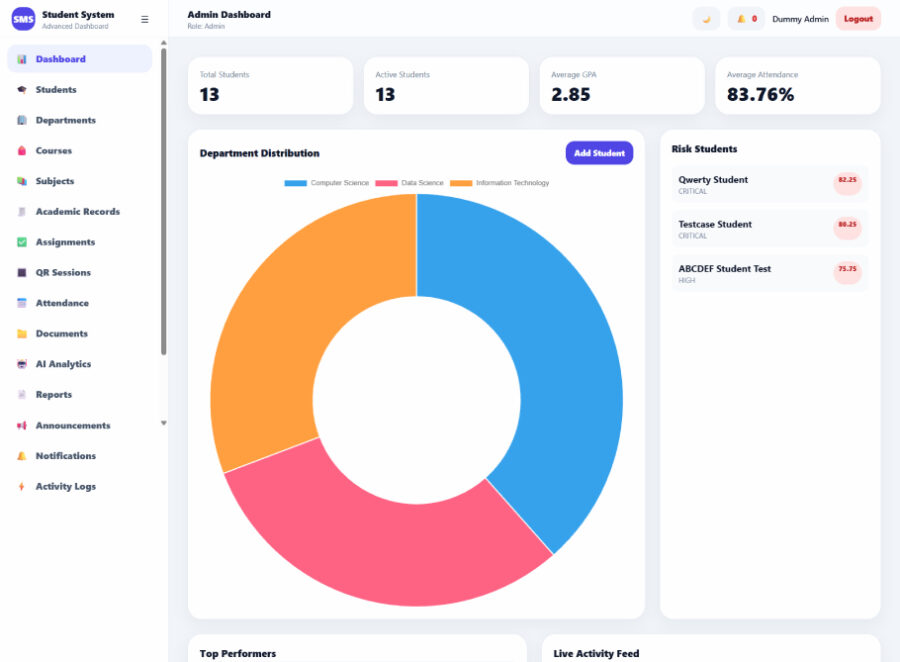
Unlike a simple student CRUD project, this system includes a more complete academic workflow. The admin can manage departments, courses, subjects, students, semester records, attendance, assignments, documents, notifications and reports from one dashboard. Students can also log in to view their own profile, academic progress, attendance summary, assignment records, documents and notifications.
The project is suitable for learning Django project structure, role-based authentication, database models, form handling, report generation, dashboard design, bulk attendance processing, subject-level assignment grading and AI-based student performance prediction. It is a useful source-code project for learners who want to study how a modern student information system can be built using Django.
What Is Included in the Project?
The downloaded ZIP contains the complete Student Management System in Django project files required to install and run the application locally. It includes the Django source code, templates, static files, configuration files, requirements file, demo seed command and project documentation files.
The package includes admin and student login, student profile management, department and course management, subject management, academic records, GPA calculation, bulk attendance, subject-level assignments, document uploads, document verification, notifications, activity logs, dashboard analytics, AI-based prediction and report exports.
The main project folder includes:
manage.py
requirements.txt
.env.example
config/
sms/
templates/
static/
README.md
LICENSE.txt
The project also includes a demo data command that creates dummy departments, courses, subjects, students, academic records, attendance records, assignments and notifications for testing.
python manage.py seed_demo_dataStudent Management System in Django Features
This project includes a complete Admin and Student workflow. The admin dashboard gives access to the main management sections, while the student dashboard focuses only on the logged-in student’s own information.
The student management module allows the admin to add and manage student accounts, profile details, academic information, status, tags and profile completion data. Departments and courses are managed separately, so student records stay clean and searchable instead of depending on manually typed department or course names.
The academic module supports semester records, subject results, marks, grades, GPA and CGPA tracking. The attendance module supports bulk attendance by date and subject, with validation against duplicate attendance and future dates. The assignment module allows the admin to create one assignment under a subject and bulk grade all eligible students from a single page.
The document module supports student file uploads, document categorisation, verification and version tracking. The reporting module supports PDF, Excel and CSV exports. The analytics and prediction module provides student performance insights using academic, attendance and engagement data.
Project Version and Requirements
This download contains Student Management System in Django version 1.0.1.
The project is built with Python and Django. It can be tested locally with SQLite, while MySQL can be configured for a more practical database setup. The required packages are listed inside the requirements.txt file.
For official framework reference, you can check the Django documentation. It is useful for understanding Django installation, models, views, templates, authentication, forms and deployment practices.
The project requirements include Python, Django, Django REST Framework, Django Channels, Scikit-learn, Pandas, OpenPyXL, ReportLab, Pillow and other supporting packages listed in the project requirements file.
Basic Installation Information
After downloading the ZIP file, extract the project folder. The expected folder name is:
student_management_system_djangoOpen Command Prompt, PowerShell or terminal inside the project folder and create a virtual environment:
python -m venv .venvActivate the virtual environment on Windows:
.venvScriptsactivateInstall the required Python packages:
pip install -r requirements.txtCopy the environment example file:
copy .env.example .envRun migrations:
python manage.py makemigrations
python manage.py migrate
Seed dummy demo data:
python manage.py seed_demo_dataStart the Django development server:
python manage.py runserverThen open the project in your browser:
http://127.0.0.1:8000/Demo Login Details
After running the demo seed command, you can sign in using the following demo accounts.
| Role | Username | Password |
|---|---|---|
| Admin | admin |
Admin@12345 |
| Student | student1 |
Student@12345 |
The included demo data uses dummy names, fake phone numbers and fictional addresses only. It does not include real student information.
MySQL Setup Information
SQLite is supported for quick local testing. If you want to use MySQL, create a database named:
student_management_systemThen update the .env file with your MySQL database details.
USE_MYSQL=True
MYSQL_DB=student_management_system
MYSQL_USER=root
MYSQL_PASSWORD=
MYSQL_HOST=127.0.0.1
MYSQL_PORT=3306
After changing the database configuration, run migrations and seed the demo data again.
python manage.py migrate
python manage.py seed_demo_data
This is only a short setup reference. The main project documentation explains the complete installation process, system workflow, database structure, modules, requirements, common errors, and limitations.
Read the Complete Project Documentation for Student Management System in Django
Before download, installing, editing or extending the student management system in django source code, it is recommended that you read the full project documentation.
The complete documentation explains the Student Management System workflow, admin and student roles, department and course management, student records, academic records, attendance process, assignment grading, document management, reports, analytics, AI prediction, technologies used, database structure, system requirements, installation steps, common errors, security notes and frequently asked questions.
Read the complete Student Management System in Django documentation
If you experience a migration issue, package installation problem, database connection error, report export issue or form validation problem, check the Common Errors and Solutions section of the main documentation before modifying the source code.
Important Usage Notice
This project is provided primarily for educational, learning, development and project demonstration purposes.
The system includes useful security features such as Django authentication, password hashing, CSRF protection, role-based access control, server-side validation, activity logs and protected admin/student views. However, an educational source-code project should still be reviewed carefully before being used with real student, institutional or personal data.
Before using the project in a live environment, review the default credentials, database settings, upload permissions, environment variables, file storage, backup process, deployment settings and production security configuration. The project is not automatically production-ready just because it runs locally.
Need More Django Projects?
If you are learning Python, Django, and web application development, you can browse more ready-to-use Django projects with source code for programming practice, academic learning and full-stack development examples.
Categories & Tags
Similar Downloads