
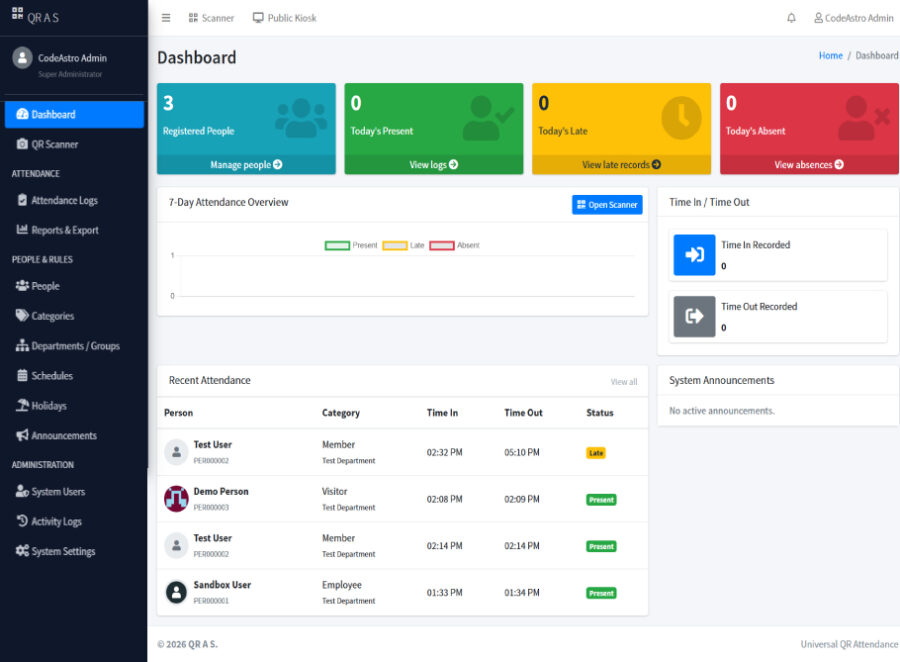
Description
About the QR Code Attendance System PHP MySQL Source Code
This download contains the complete source code for the QR Code Attendance System built with PHP and MySQL – Universal Edition. The project is designed for schools, companies, offices, training centres, organisations, events and other environments that need a practical way to register people and record attendance through QR code scanning.
Unlike attendance projects built specifically for students or employees, this system uses a flexible People-based structure. Each registered person can be assigned to a configurable category, department or group and receives a unique QR code. This allows the same installation to manage students, employees, faculty members, visitors, contractors, volunteers, members and other attendee types without creating separate modules for each one.
The system supports QR-based attendance through both an authenticated staff scanner and a separate public self-service attendance kiosk. With the public kiosk, people can scan their own QR cards from a shared tablet, phone, laptop or desktop computer without accessing the administration dashboard.
What Is Included in the Project?
The downloaded ZIP contains the complete QR Code Attendance System PHP MySQL project, including the application source files, MySQL database structure and the files required to install and run the system.
The package includes the AdminLTE administration dashboard, secure authentication, user roles, People management, categories, departments and groups, attendance schedules, QR code generation, QR card printing, public QR scanning, automatic Time In and Time Out, optional break tracking, attendance corrections, reports, notifications, activity logs, holidays, announcements, system settings and database backup and restore functionality.
The complete database structure is included at:
database/schema.sql
A browser-based installation page is also included at:
public/install.php
The project contains a composer.json file for installing the PHP libraries required for QR image generation, PDF reports and Excel exports.
Public QR Attendance Kiosk
One of the main features of this version is the separate public attendance kiosk.
Instead of requiring an Administrator or Staff member to manually scan every person's QR code, a shared device can be placed at an entrance, classroom, reception desk or attendance point. Registered people can then scan their own QR cards directly.
The default local kiosk URL is:
http://localhost/universal_qr_attendance/public/kiosk.php
The first accepted QR scan records Time In, while the next accepted scan records Time Out. Before saving attendance, the system verifies the QR code, person status, assigned schedule, available attendance day, allowed scan window and existing attendance record.
The public kiosk does not display the administration dashboard, People records, reports, settings or other restricted management features.
Project Version and Requirements
This download contains QR Code Attendance System – Universal Edition.
The project requires PHP 8.2 or newer, MySQL 8.0 or a compatible MariaDB installation, and Composer 2 for installing the required PHP packages.
For local development, the project can be installed using XAMPP or another compatible Apache, PHP and MySQL environment.
The required PHP extensions include PDO MySQL, GD, Mbstring, ZIP, DOM and Fileinfo.
The QR scanner also requires a modern browser with camera support. Camera access normally works on localhost during local development, while an online installation should use HTTPS because modern browsers restrict camera access on unsecured websites.
Basic Installation Information
After downloading the ZIP file, extract the project folder and place it inside the XAMPP web directory:
C:xampphtdocsuniversal_qr_attendance
Open Command Prompt or PowerShell inside the project folder and install the Composer dependencies:
composer install --no-dev --optimize-autoloader
Start Apache and MySQL from the XAMPP Control Panel and open:
http://localhost/universal_qr_attendance/public/install.php
The installer will ask for the database connection details and the first Super Administrator account. The default database name used by the project is:
universal_qr_attendance
This is only a short installation reference. The main project article contains the complete step-by-step setup process, required PHP extensions, manual database installation instructions and troubleshooting information.
Read the Complete Project Documentation
Before installing or modifying the source code, it is recommended that you read the full project documentation.
The complete documentation explains the system workflow, user roles and permissions, QR attendance process, public kiosk operation. Along with technologies used, database structure, server requirements, installation steps, system usage, common errors, security considerations, project changelog and frequently asked questions.
Read the complete QR Code Attendance Management System in PHP MySQL documentation
If you experience an installation problem, QR scanner issue or database connection error, check the Common Errors and Solutions section of the main documentation before making changes to the source code.
Important Usage Notice
This project is provided primarily for educational, learning, development and project demonstration purposes.
The application includes security measures such as password hashing, prepared database queries, CSRF protection, role-based permissions, QR validation, expiring password-reset tokens, activity logging and public-kiosk request protection. However, an educational project should still be reviewed before being used with real organisational or personal information.
QR codes can also be copied or shared. An organisation requiring stronger identity verification should combine QR attendance with staff supervision or additional identity checks.
Need More PHP MySQL Projects?
If you are learning PHP, MySQL and web application development, you can browse more ready-to-use PHP MySQL projects with source code for practice, study and project development.
Categories & Tags
Similar Downloads